Honest answers about how BinDist works, what it is and isn’t, and how it fits alongside your existing stack.
On self-hosted deployments, yes; you choose your own hostname (for example api.yourcompany.com) at deploy time, and your customers point at that. On the hosted service, all tenants currently share the same API hostname; per-tenant custom domains aren’t offered today. Tenants are identified by their API key, not by subdomain.
Yes, that’s a primary use case, not an afterthought. There’s a JavaScript client for talking to the API, and you can mint per-customer API keys programmatically from your own backend. Two integration patterns work out of the box:
Endpoint reference and code samples live in the Docs.
No. Your binaries sit in standard S3-compatible object storage; downloads are pre-signed links that any HTTP client can fetch; and Pro/Starter tiers get weekly backups every Sunday at 02:00 UTC that include all of your data. The self-hosted edition is also free and uses the same source code, so “migrate to your own cloud” stays a real fallback.
Hosted tenants run in the EU (Scaleway, Paris). Self-hosted deployments run wherever you put them.
Admin permissions are split across two keys so a leak of the day-to-day key doesn’t hand over billing or backups. Every tenant is provisioned with:
Most teams keep the Financial Admin key in cold storage and only use it for billing changes or to recover from a compromised Apps Admin key.
The blast radius is limited by design. Using the Financial Admin key, you can regenerate the Apps Admin key from the Account page; the leaked key stops working at that moment. Even before you regenerate, the leaked key cannot:
Every administrative action taken with admin keys (creating or regenerating keys, promoting a version to enabled, customer changes, payments, subscription lifecycle) is recorded on the Audit Log page, so you can see exactly what was changed before you noticed. Read-only downloads have their own per-customer log on the Activity page with 90-day retention.
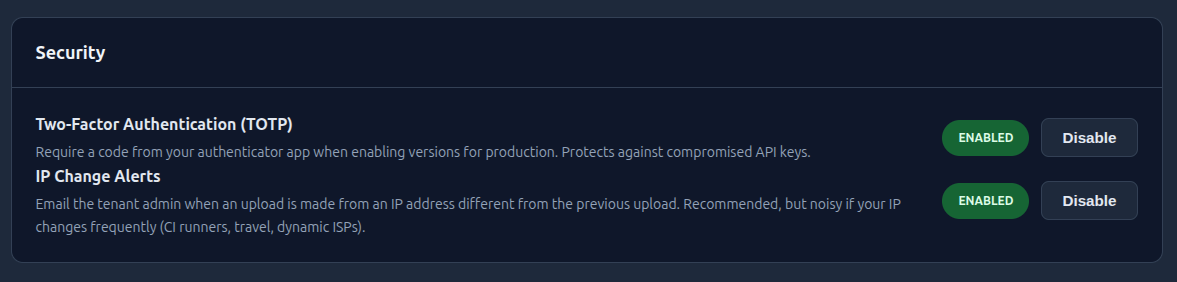
Yes, TOTP (works with any standard authenticator app: Google Authenticator, 1Password, Authy, etc.). 2FA is enabled by the Financial Admin and, once on, is required at two specific points: disabling 2FA itself, and promoting a version to enabled (the moment a build becomes downloadable to your customers). The intent is that even with a leaked Apps Admin key, an attacker can’t ship a malicious build to your users without your authenticator.
No. BinDist controls who can download what; it does not validate license keys, count seats, or enforce expiry inside your software. License verification happens in your own system or via a third-party licensing service. BinDist sits in front of that.
Yes, for administration and reference. Each customer record has dedicated fields for License, Reference, Notes, and Email, so your support and billing team have one place to look up “what does customer X have?”. Important caveat: BinDist does not validate or enforce these. At runtime, your software (or your licensing provider) is what checks the key is real, unexpired, and within seat limits. Treat the field as a labelled note attached to the customer, not a source of truth your binary trusts.
Patterns that compose cleanly:
The Activity page (90-day retention) records who downloaded which version, when, and from which IP, which is useful evidence even if license enforcement happens elsewhere.
No. The 14-day Trial does not require a credit card. You only enter payment details when you sign up for Starter or Pro.
For paid tiers (Starter / Pro), payment details are validated at signup but the card isn’t charged until day 14. From day 14 onwards the same card is charged once a month on a 30-day cycle. If validation fails, or any monthly charge is declined, the tenant falls back to Trial limits and you can re-enter card details to reactivate. The Trial tier doesn’t auto-convert; you choose whether to upgrade.
For paid tiers (Starter / Pro) you can pay by card or PayPal. Both options support the 14-day trial: payment details are validated at signup, the first charge runs on day 14, and the same details are reused for each monthly renewal afterwards.
Bank-debit methods like SEPA and iDEAL aren’t offered because setting up a recurring mandate on those rails requires an actual charge upfront, which would defeat the point of validating without billing during the trial.
Yes. Upgrade from Trial to Starter or Pro, or from Starter to Pro, via the upgrade flow on the Account page. Upgrades require the Financial Admin key.
Not as a self-service action today. The only automatic downgrade is the fallback to Trial when a charge is declined (first charge or any monthly renewal). If you need to move from Pro to Starter, contact support and we’ll handle it manually. To stop a paid subscription voluntarily, use the cancellation flow on the Account page (described in “What happens to my data if I close my account?”).
Pre-signed download URLs expire after 30 minutes. Share-link tokens default to 30 minutes and can be configured up to 24 hours per link.
90 days. The same retention applies to upload tracking (which includes the source IP for each upload).
Weekly, every Sunday at 02:00 UTC, for all active paid tenants (Starter and Pro). You can also trigger an off-schedule backup at any time, and inspect the contents of any backup, from the Backups page. Backup operations require your Financial Admin key. Self-hosted deployments use the same backup logic on the same schedule.
Closure is a deliberate action: a Financial Admin cancels the subscription from the Account page. Cancellation honours the period you already paid for, then archives. Concrete timeline for a paid tier:
Recurring billing is stopped at the moment of cancellation, never at the end of the grace period.
Trial-tier closures and accounts whose subscription was already cancelled (e.g. card decline) skip the grace period: archival starts immediately because there is no paid period to honour.
Yes. The same source code that powers the hosted service is published as the open-source self-hosted edition. Deploy it to your own AWS or Scaleway account, no per-tenant or per-download fees. The trade-off vs. hosted is that you operate the infrastructure yourself: database, function deploys, backups, monitoring.
Your binaries are already in standard S3-compatible object storage that you can mirror with any standard S3 client. Backups bundle your application files plus a database export. Combined with the open-source self-hosted edition, you have a real exit path, not just a contractual one.