Publish every build from the same pipeline that produces it. Upload a new release to BinDist, stage it on a test channel, and promote it to your customers when it is ready.
Your pipeline already produces a versioned artifact on every successful build. BinDist turns that artifact into a release your customers can pull through the software update API, with no release servers to run and no download links to manage by hand.
A publish step has two deliberate stages:
Because new versions start disabled, they sit on the test channel where your QA, or a smoke test in the pipeline itself, can download and verify them through the update API before anyone else sees them. When the build checks out, one promote step enables it and the next update poll from your customers picks it up. If something is wrong, you simply never promote it, and no customer is ever exposed to it.
That keeps publishing and releasing as two separate actions rather than one risky one.
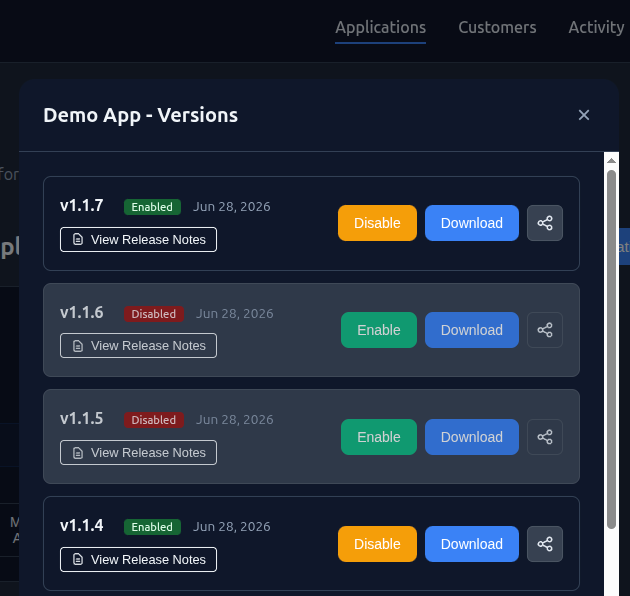
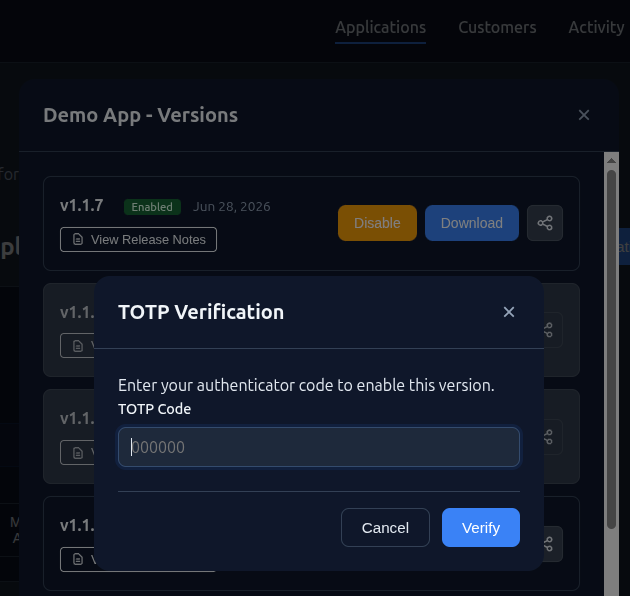
On the hosted service at bindist.eu you do not have to script the promotion at all. You can enable a version straight from the dashboard, and releases can be protected with two-factor authentication. Once it is configured, promoting a build to your customers requires a valid authenticator code.
This puts a deliberate human gate on the moment that matters. Your pipeline can upload and stage builds automatically, but turning one loose on customers takes an authenticator code that only your product owners and release engineers hold, so a leaked upload credential or a misfiring job cannot ship a release on its own.
The publishing endpoints are plain REST, so you can wire them into your pipeline in whatever language your tooling already uses. There is nothing BinDist-specific to install, and every endpoint is covered in the documentation.
If you want a head start, we also publish ready-made PowerShell scripts in the open-source bindist-terraform repository (PowerShell runs on Linux, macOS, and Windows, so they fit GitHub Actions, GitLab CI, Azure Pipelines, or any other runner). Use them as they are, adapt them, or skip them and call the API yourself.
Authenticate with your Apps Admin key, the day-to-day key for uploads and version management. Keep it as a CI secret and never commit it. It is the lower-privilege of the two admin keys; the FAQ explains how it differs from the Financial Admin key.
Using the scripts, a publish-and-release step looks like this:
# Credentials come from CI secrets (your Apps Admin key)
$tenant = $env:BINDIST_TENANT_ID
$secret = $env:BINDIST_APPS_ADMIN_SECRET

# 1. Upload the build as a new, disabled version
.\ci-scripts\Upload-Application.ps1 -TenantId $tenant -Secret $secret `
  -ApplicationId "myapp" -Version "2.0.0" -FilePath ".\myapp.exe" -ReleaseNotes "Bug fixes"

# 2. Promote it to customers once it has been verified
.\ci-scripts\Update-Version.ps1 -TenantId $tenant -Secret $secret `
  -ApplicationId "myapp" -Version "2.0.0" -IsEnabled $true
Publishing is designed around the way real CI/CD works: automated, repeatable, and safe to run on every build.
New versions arrive disabled. Nothing ships to customers until you explicitly promote the build.
Verify a build through the test channel before release, then promote only what passes.
On the hosted service, promoting a version can require an authenticator code, so only your release owners can ship to customers.
Plain REST endpoints wire into any CI runner and any language. Ready-made scripts are there if you want them.
Released versions stay scoped by API key, so each customer only ever sees what they are licensed for.
Every published version is retained with its notes, so you can promote, supersede, or reference any prior build.
Start free with the open-source version, or let us run the release infrastructure for you.
View Pricing